| 01 Checking Equipment in the Armory | 02 Swapping Equipment in the Armory |
| 03 Transferring Enhancement Info to New Gear | 04 Checking Equipped Results and Remaining Gear |
· The Armory Stores Your Collected Gear
Used to extract registered gear by paying materials and costs, or to swap currently equipped gear.
Open via the Armory button in the inventory or through the ESC menu.
· If Picked-Up Gear Isn't in Your Inventory
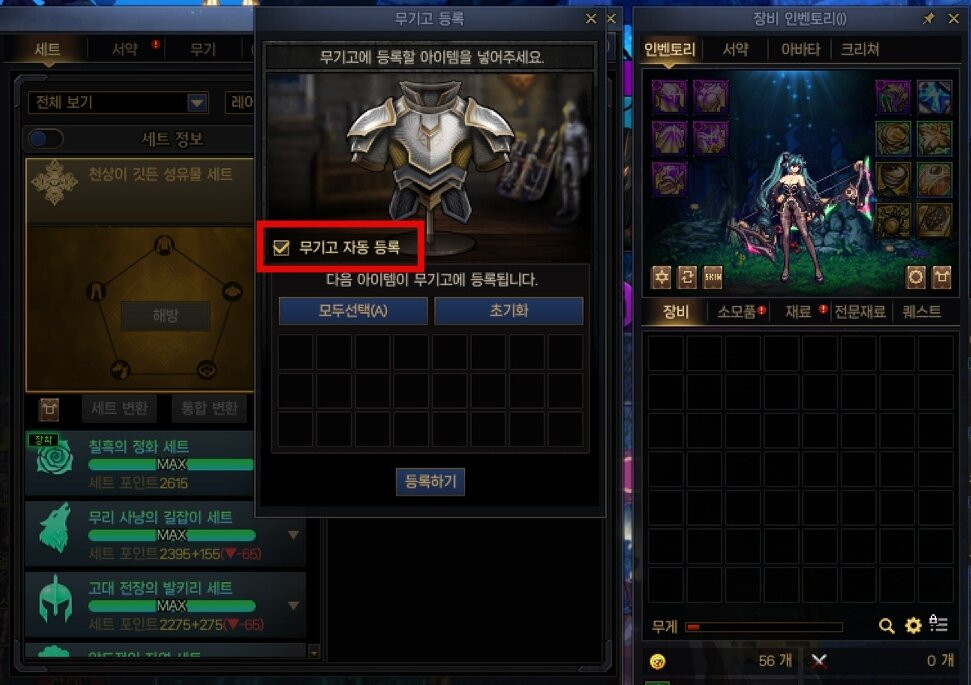
Check the 'Auto Armory Registration' setting on the Armory registration screen.
When enabled, duplicate gear obtained from dungeons will be automatically disassembled and registered to the Armory.
This applies to Lv. 115 items, including those picked up in dungeons or earned from card rewards.
Equipment with Otherverse Energy and Oath Crystals are excluded from auto registration.
The setting is saved per character and is disabled by default.
· Check Remaining Inventory Gear First
Check if the gear is for Buff Enhancement or if it can be Amplified (Otherverse Energy).
Check the target items under 'Register to Armory' before proceeding.
Equipment registered in the Armory can be crafted or swapped at any time.
Use 'Equipment Conversion' if your desired gear is in the Armory.
· Change Equipped Gear to Your Desired Gear
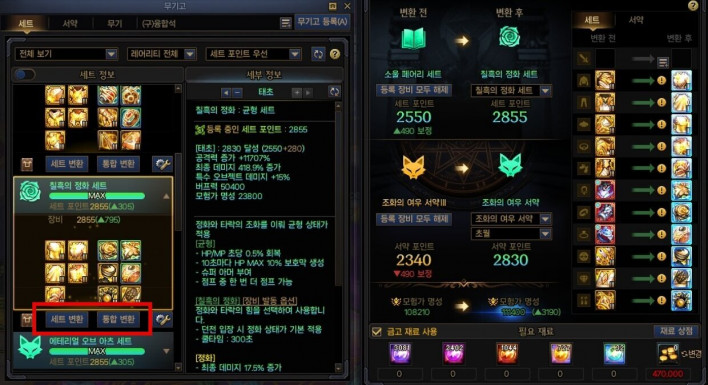
Set Conversion: Converts only the equipment currently worn by the character.
Integrated Conversion: Converts both the equipment worn by the character and their Oaths.
Armory → Equipment Conversion → Select the gear slot and piece to convert.
Exclude any slots you do not wish to convert.
Check the conversion results and required materials before executing.
Only Lv. 115 equipment registered in the Armory can be converted.
· Enhancement Values Are Retained
Retains the Reinforcement, Amplification, Refinement, Enchantment values, and item grade of the existing gear.
You can swap equipment directly via Equipment Conversion without needing to craft a new piece and use Inheritance.
· Check Equipment Rarity for Tuning
Tuning levels are retained when converting to the same slot and rarity.
Converting to a different rarity will not transfer the tuning level, but the Souls spent on tuning for that rarity will be refunded.
Example: Epic Top → Epic Top retains tuning / Epic Top → Legendary Top does NOT retain tuning.
· If You Have No Gear Equipped
Gear registered in the Armory can be crafted by spending Souls and costs.
Check the crafted equipment in your inventory and equip it.
Use 'Inheritance' when replacing gear with a new piece in your inventory.
Inheritance is a feature that transfers Reinforcement, Amplification, Refinement, and Enchantment information from existing equipment to another piece.
· First Check If It Is the Same Slot
Available between untradable Lv. 115 Rare or higher equipment for the same slot.
Weapons can be transferred across different types within the same character class family, and tuning levels are retained.
Tradable or sealable equipment is excluded.
· How to Perform Equipment Inheritance
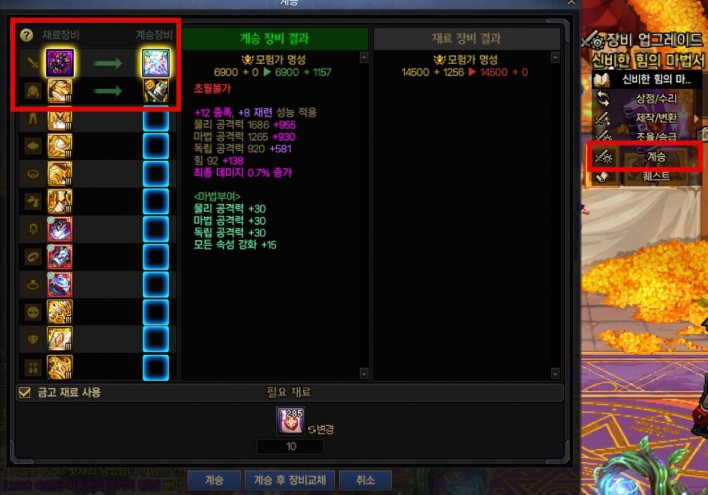
Seria's Room → Mystical Grimoire → Equipment Inheritance
Register the new equipment to be used first, followed by the existing equipment to transfer stats from, then click Inheritance to complete.
· Precautions
If both items have enhancement information, their values will be swapped with each other.
Tuning levels are not transferred through Inheritance.
· Verify If the Gear Is What You Need
Check the equip level, class requirements, weapon type, and verify if it matches your Weapon Mastery if applicable.
· Check Changed Gear and Set Effects
Verify that Reinforcement and Enchantments were properly transferred after equipping.
Check the effects gained from collecting the same set pieces; swapping to a different set may change your active set effects.
· Decide What to Do with Remaining Gear First
Check remaining gear's Reinforcement, Enchantments, and purpose before storing after Inheritance.
Keep necessary equipment in storage and lock organized items using Alt + Left Click.
Only process unneeded items eligible for registration after checking them in the Armory registration screen.